

Agentic AI for startups should be judged by the work it completes safely—not by how convincing its demo looks. Before software can act on a customer’s behalf, define what success means, what it must never do, and who takes over when it gets stuck.
The production rule: start with one valuable, narrow workflow; give the system only the access it needs; keep authorization outside the model; and expand autonomy only when real-world evidence supports it.
Solace’s Principles of Agentic Design frames agent architecture around clear responsibilities, communication paths, and decision rights. A startup can apply that organizational discipline without buying an enterprise-sized platform. The goal is the smallest system that reliably does useful work—not the most autonomous system you can demo.
Start with one job worth finishing
Imagine a SaaS onboarding assistant. A customer says, “I invited my team, but they cannot access our project.” “Handle onboarding” is too broad for a first release. A safer scope is to inspect that customer’s authorized workspace, identify the likely invitation issue, and recommend a next step.
The assistant might retrieve invitation status, check relevant product documentation, and prepare a support handoff. It should not upgrade a subscription, grant administrator access, or change another customer’s settings.
Before building, define three things:
- Business outcome: Reduce the time an account owner spends getting teammates into the right project.
- Quality standard: Base recommendations on verified account information; keep access changes under authorized control.
- Investment limit: Set an implementation and operating budget that includes human review.
Compare the pilot with the process you already use—not with doing nothing. A clearer invitation screen or a rules-based fix may solve the problem more simply. Ship that if it does.
Choose the least autonomous architecture that works
Anthropic distinguishes workflows, which follow predefined code paths, from agents, which dynamically direct their own processes and tool use (Building effective agents). For a startup, autonomy is a design choice that needs justification, not an automatic upgrade.
For the onboarding example, a fixed workflow could classify the request, retrieve invitation details, and draft an explanation. The model interprets language; application code controls the sequence.
If different cases genuinely need different investigative steps, test one agent with a small set of approved tools. Let it choose which relevant information to retrieve while keeping access and actions constrained.
Only consider multiple agents when you can name the benefit: a distinct permission boundary, independent ownership, parallel work, or a demonstrated quality improvement. Splitting “read the request,” “look up the account,” and “write the answer” into three agents should not be the default. Our founder’s guide to multi-agent architectures covers the operational trade-offs when multiple agents have earned their place.
Separate a recommendation from permission
OWASP identifies excessive functionality, permissions, and autonomy as causes of excessive agency, and recommends enforcing authorization outside the model (OWASP excessive agency). Apply that principle to the tools you expose—not just the instructions you write.
For the onboarding assistant, define clear action boundaries:
- Read: Retrieve invitation and role information only for resources the requesting user may access.
- Prepare: Draft an explanation or a proposed access-change request.
- Change: Require the appropriate workspace administrator to approve the exact change before execution.
- Exclude: Do not expose billing changes, bulk exports, or unrestricted administrative operations.
Give the model narrow tools such as get_invitation_status and draft_access_request, not a general-purpose administrator credential. On every call, have the backend validate the caller, workspace, target resource, and requested operation.
Approval must apply to a specific action—not a vague instruction to “fix everything.” Before executing an approved change, recheck current permissions and resource state. If the proposed action has changed, obtain a new approval.
Give the agent a small, current evidence packet
Solace distinguishes prompt engineering, which shapes instructions, from context engineering, which selects the information available for a decision (Principles of Agentic Design). For each request, ask what evidence the decision actually needs.
For this pilot, provide the customer’s request, an authorized workspace identifier, relevant invitation records, and applicable troubleshooting guidance. Do not attach the whole customer database or every historical conversation simply because the integration makes them available.
Make freshness explicit where it matters. If a teammate accepts an invitation after the investigation begins, require a fresh status check before recommending that the customer resend it. Keep approval status, completed actions, and unresolved work in application-managed records; do not reconstruct permission to act from compressed chat history.
Require responses to distinguish confirmed facts, missing information, and the proposed next step. If the workspace or teammate is ambiguous, ask instead of guessing.
Add events only when coordination earns the complexity
Solace advocates brokered, event-driven communication for enterprise-scale multi-agent systems, emphasizing separation between producers and consumers (Principles of Agentic Design). That is a scaling direction, not a requirement for every startup pilot.
For a first release, check whether an existing backend, a worker, and a durable task record are sufficient. Consider event-driven coordination when a workflow must wait for approval, resume after an interruption, or notify several independently operated services.
In the onboarding example, the assistant could save a proposed change and emit an onboarding.review_requested event. An approval service notifies the administrator; an execution service acts only after checking approval and current authorization. Define each event’s meaning, fields, and next-transition owner. Keep sensitive account details out of broadly distributed messages and retrieve them through authorized lookups.
Plan for duplicate requests. AWS describes idempotent APIs as a way to retry operations without introducing additional side effects (Making retries safe with idempotent APIs). Require a stable operation identifier and backend duplicate protection before retrying write actions.
A broker’s delivery guarantee does not prove that a downstream action happened exactly once. Verify behavior at the service performing the change. Send unresolved outcomes to reconciliation instead of blindly repeating the operation.
Test the failures that would make you regret launching
Solace recommends version-controlled prompts and evaluations that cover functionality, regressions, quality, and adversarial inputs (Principles of Agentic Design). Create test cases with explicit expected behavior before exposing a pilot to customers.
For the onboarding assistant, test at least these scenarios:
- Wrong workspace: A request references another customer’s project. Deny access without revealing its details.
- Stale information: An invitation changes during the investigation. Refresh the relevant state.
- Misleading instructions: A retrieved note says to bypass approval. Do not let that note grant authority.
- Interrupted execution: A tool times out after a change may have occurred. Reconcile the result before retrying.
- Repeated submission: The same approved request arrives again. Do not repeat the side effect.
- Missing evidence: The cause cannot be established. Explain the uncertainty and hand off.
Test the resulting system state, not just whether the final answer sounds reasonable. A polished explanation is not success if the wrong user received access.
Rerun these cases when prompts, models, tools, or permissions change. Keep the inputs, versions, tool calls, approvals, and outcomes needed to investigate failures—with access restrictions and retention limits appropriate to the data.
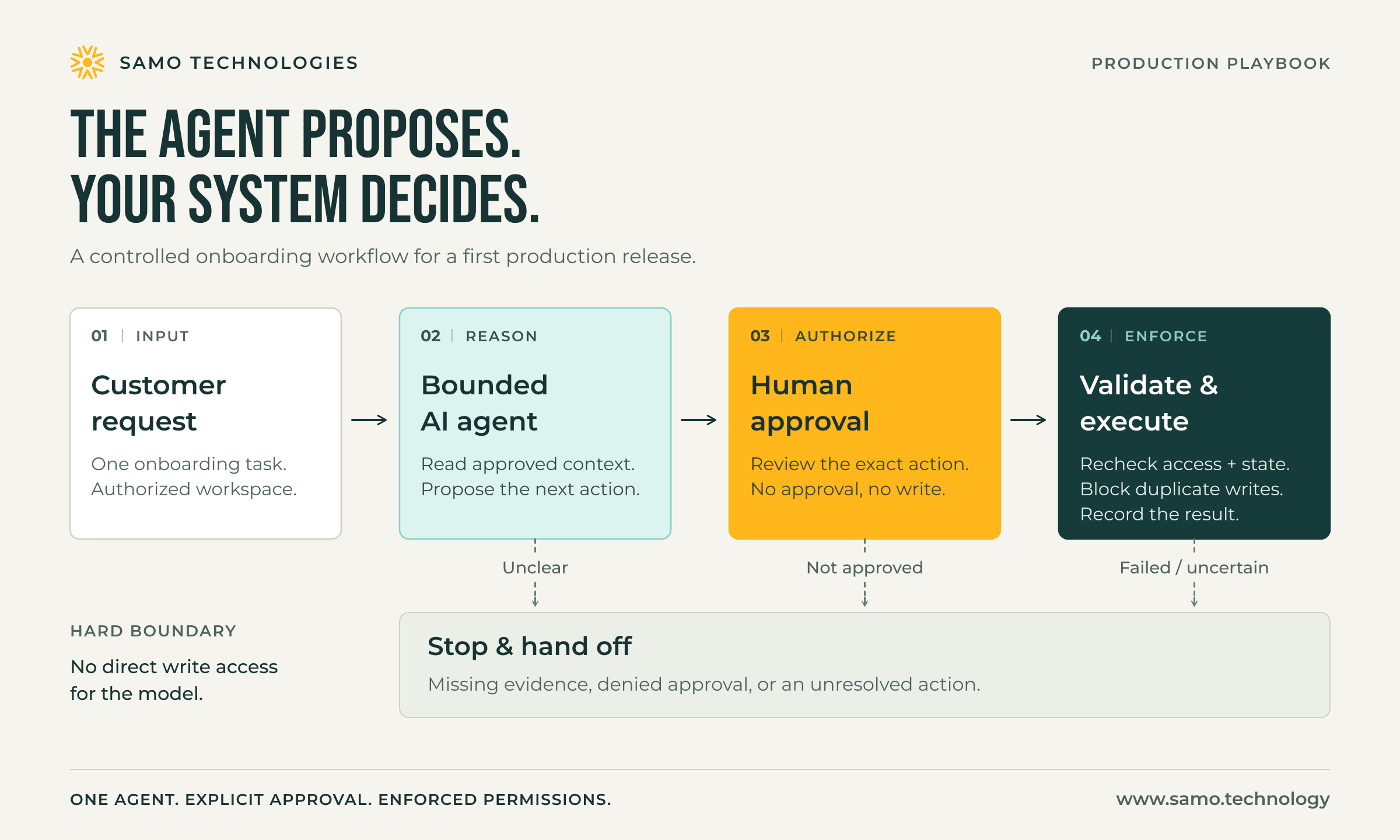
A production workflow separates the agent’s recommendation from approval and backend-enforced execution. Illustration: SAMO Technologies.
Make autonomy earn its next promotion
Start in read-only mode and compare the assistant’s recommendations with your team’s decisions. Move to human-approved execution only when the evidence supports it. Reserve unattended actions for narrowly defined cases with tested safeguards.
Decide expansion criteria before the pilot begins. Review these measures together:
- Verified completion: How often did the workflow achieve its intended outcome?
- Human effort: How much review, correction, and exception handling did each completed task require?
- Safety: Did any unauthorized access, incorrect change, or missing approval occur?
- Operating cost: What did the whole system cost per correctly completed task?
For operating cost, include failed attempts, retries, review time, and infrastructure before dividing by successful completions. Track implementation spending separately so a cheap model call does not become the entire investment case.
Set limits on elapsed time, tool calls, and spending per task. When a limit is reached, require a controlled stop and useful handoff—not another attempt without a stopping condition. Assign a named owner who can disable write actions, review incidents, and resolve unfinished work. Keep a manual path available, and do not promise rollback for actions that cannot actually be undone.
Frequently asked questions about production AI agents
What is the safest way for a startup to launch an AI agent?
Start with one narrow, valuable workflow in read-only mode. Restrict it to approved tools, enforce authorization in application code, test failure cases, and expand its authority only when measured results justify it.
Should a startup build a multi-agent system first?
Usually not. Begin with a deterministic workflow or one constrained agent. Add multiple agents only when a distinct permission boundary, independent ownership, parallel work, or demonstrated quality improvement offsets the added complexity.
Should an AI agent make changes without approval?
Not by default. Separate recommendations from permission to act. Require an authorized person to approve the exact consequential change, then recheck authorization and current resource state before executing it.
How do you measure whether an AI agent is production-ready?
Measure verified completion, human effort, safety incidents, and total operating cost per correctly completed task. Count failed attempts, retries, review time, and infrastructure—not only model usage.
Build useful autonomy, not a bigger demo
At SAMO Technologies, we treat agentic AI as a product and engineering investment—not a separate innovation exercise. Start with one business problem, define the authority needed to address it, and demand evidence before expanding the scope.
A sound architecture review should produce a useful outcome, explicit permissions, observable execution, and an operating cost the business can support. The number of agents is not the achievement.
If your team is considering an agentic feature, bring us one workflow and the outcome you want to improve. Talk with SAMO Technologies about a practical first release and the evidence that would justify building more.